









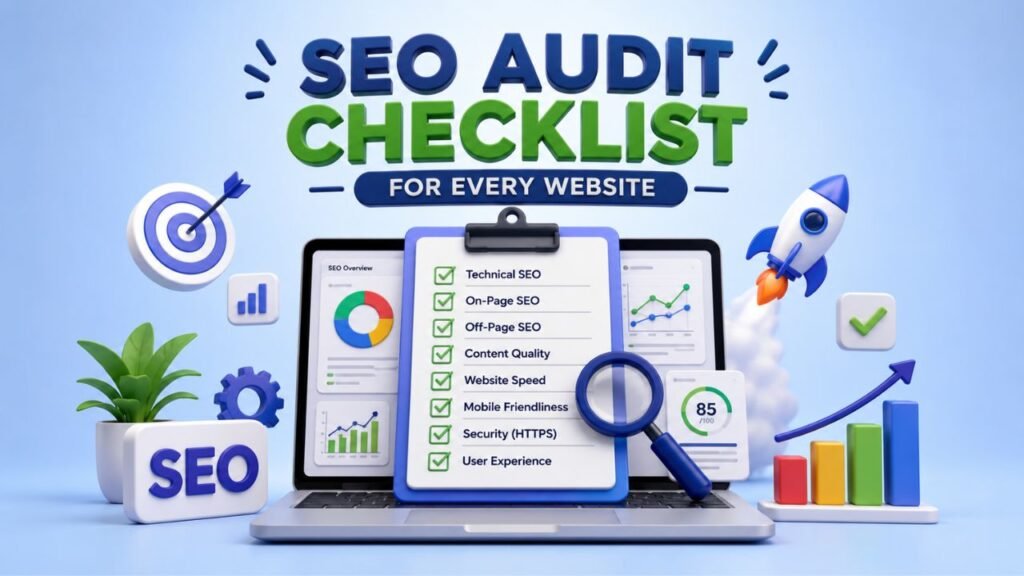
An effective SEO audit does more than uncover broken links or missing meta descriptions. It helps you understand why a website is performing the way it is in organic search and, more importantly, what you should fix first.
Whether you are auditing a small business website, an ecommerce store, a publisher, or a large enterprise site, the process should cover technical SEO, crawling, indexing, content, on page optimization, internal linking, performance, structured data, backlinks, and user experience.
This SEO Audit Checklist gives you a practical framework you can use to audit almost any website. Instead of treating every issue equally, you will learn how to identify problems, assess their potential impact, prioritize fixes, and monitor the results.
Table of Contents
What Is an SEO Audit?
An SEO audit is a systematic evaluation of a website’s ability to be discovered, crawled, indexed, understood, and ranked by search engines.
A professional audit looks beyond individual keywords. You need to evaluate the entire organic search ecosystem surrounding a website.
An SEO audit typically covers:
- Technical SEO
- Crawlability
- Indexability
- Website architecture
- On page SEO
- Content quality
- Search intent
- Internal linking
- Image SEO
- Structured data
- Mobile SEO
- Core Web Vitals
- Backlinks
- Competitor performance
- Local SEO when applicable
- Search Console data
- Organic traffic and conversions
The goal is not to produce a huge list of errors. Your goal should be to find the issues that can make a meaningful difference to organic visibility and user experience.
Why Is an SEO Audit Important?
Search performance can decline for many reasons. A website may have excellent content but poor indexability. Another site may have strong backlinks but weak search intent alignment. A technically sound website can still struggle if its content does not provide enough value for the queries it targets.
An SEO audit brings these problems together.
A properly executed audit can help you:
- Discover crawling and indexing problems
- Identify technical barriers
- Find duplicate or thin content
- Improve internal linking
- Detect broken pages and redirects
- Improve page titles and descriptions
- Identify content gaps
- Evaluate search intent
- Find opportunities for better rankings
- Analyze competitors
- Improve website performance
- Prioritize SEO work based on impact
The biggest advantage is clarity. Instead of making random SEO changes, you can build a prioritized action plan based on evidence.
How Often Should You Perform an SEO Audit?
There is no universal schedule that works for every website.
The right frequency depends on the website’s size, publishing activity, technical complexity, and rate of change.
| Website Type | Suggested Audit Frequency |
|---|---|
| Small business website | Every 6 months |
| Active blog | Every 3 to 6 months |
| Ecommerce website | Monthly or quarterly |
| Large enterprise website | Monthly or continuously |
| Recently redesigned website | Immediately after launch |
| Website experiencing traffic loss | Immediately |
You should also perform an audit after major events such as a website migration, domain change, CMS migration, redesign, significant algorithm changes, or a sudden organic traffic decline.
SEO Audit Checklist: 50+ Essential Checks
The following checklist is organized around the major areas an SEO professional should investigate.
1. Check Website Crawlability
Before worrying about keyword optimization, make sure search engine crawlers can access the pages that matter.
Review:
- robots.txt
- XML sitemap
- Internal links
- Crawl depth
- Crawl errors
- Blocked resources
- Redirects
- URL parameters
- Orphan pages
- JavaScript dependent content
A page cannot perform well in organic search if search engines cannot properly discover or process it.
Check the Robots.txt File
Review the site’s robots.txt file and make sure important sections are not accidentally blocked.
Pay particular attention to rules affecting:
- Product pages
- Blog posts
- Category pages
- Important landing pages
- CSS and JavaScript resources
- Image resources
Do not assume every blocked URL is a problem. Some areas should intentionally remain inaccessible to crawlers. The important question is whether valuable search focused content is being restricted.
Check Crawl Depth
Review how many clicks are required to reach important pages from the homepage or relevant category pages.
If valuable content sits deep within the site architecture and receives few internal links, both users and search engines may have difficulty discovering it efficiently.
Find Orphan Pages
Orphan pages are URLs that have no internal links pointing to them from other crawlable pages.
They can still appear in an XML sitemap or receive external links, but they are disconnected from the site’s internal architecture.
Identify orphan pages and determine whether each one should:
- Receive relevant internal links
- Be consolidated
- Be redirected
- Be removed
- Remain isolated for a legitimate reason
2. Check Indexability
Crawlability and indexability are different.
A search engine may be able to crawl a URL without necessarily indexing it.
Review:
- Noindex directives
- Canonical tags
- HTTP status codes
- Duplicate URLs
- Redirected URLs
- Index coverage
- XML sitemap URLs
- Parameterized URLs
- Pagination
- Thin pages
Review Noindex Tags
- Make sure important pages do not contain an accidental
noindexdirective. - A simple technical mistake can prevent an otherwise valuable page from appearing in search results.
- At the same time, don’t remove every noindex directive you find. Some pages should not be indexed, including certain utility pages, internal search results, or low value URL variations.
Audit Canonical Tags
Canonical tags help indicate the preferred version of substantially similar URLs.
Check whether canonical tags:
- Point to the correct URL
- Use consistent protocols
- Use the preferred hostname
- Avoid pointing important pages to unrelated URLs
- Match the site’s indexation strategy
Canonicalization is a signal, not a guaranteed command. Your broader internal linking, redirects, sitemap, and content architecture should support the same preferred URL.
3. Perform a Technical SEO Audit
Technical SEO provides the foundation for organic search performance.
Check:
- HTTPS implementation
- SSL certificate
- HTTP to HTTPS redirects
- WWW and non WWW consistency
- Canonicalization
- XML sitemap
- Robots.txt
- 404 pages
- 301 redirects
- Redirect chains
- Redirect loops
- Duplicate URLs
- URL structure
- Site architecture
- Server response codes
Find Broken Links
Identify internal links that lead to:
- 404 pages
- 410 responses
- Server errors
- Redirect chains
- Incorrect destinations
Fix important broken internal links rather than treating every broken URL as equally urgent.
If a deleted page has a highly relevant replacement, a redirect may be appropriate. If no equivalent replacement exists, avoid redirecting the URL simply to another unrelated page.
Review Redirects
Look for unnecessary redirect chains and loops.
For example:
Old URL → Redirect → Redirect → Final URL
Whenever possible, important links should point directly to the final destination.
4. Audit Core Web Vitals and Page Experience
Website performance matters for both users and search visibility.
Review Core Web Vitals and broader page experience signals, including:
- Largest Contentful Paint
- Interaction to Next Paint
- Cumulative Layout Shift
- Mobile performance
- Server response time
- Image loading
- JavaScript execution
- CSS delivery
- Caching
Do not optimize performance based only on a laboratory score.
Look at real user data when available and evaluate how the site actually behaves for visitors.
Improve Largest Contentful Paint
Investigate:
- Slow server responses
- Large hero images
- Render blocking resources
- Excessive JavaScript
- Poor caching
- Slow third party resources
Reduce Layout Shifts
Look for elements that unexpectedly move while a page loads.
Common causes include:
- Images without dimensions
- Dynamically injected content
- Advertisements
- Web fonts
- Late loading components
A stable page provides a better experience and reduces accidental interactions. If you need help applying these performance fixes, this web development for beginners guide explains essential skills related to responsive design, images, JavaScript, CSS, and caching.
5. Perform a Mobile SEO Audit
Search engines evaluate websites using mobile focused crawling and indexing, so your mobile experience deserves close attention.
Check:
- Responsive design
- Mobile navigation
- Readable text
- Tap targets
- Page speed
- Mobile content parity
- Images
- Videos
- Structured data
- Intrusive elements
Make sure important content available on desktop is also accessible on mobile.
Don’t create a simplified mobile experience that removes valuable information users need.
On Page SEO Audit Checklist
Once the technical foundation is stable, review individual pages.
6. Audit Title Tags
Every important indexable page should have a useful, descriptive title.
Check:
- Relevance to the page
- Search intent
- Primary topic
- Uniqueness
- Clarity
- Compelling wording
- Brand usage where appropriate
Avoid writing titles purely around character limits.
A title should help both search engines and users understand what the page offers.
7. Audit Meta Descriptions
Meta descriptions are not a direct ranking factor, but they can influence how users interact with search results.
Review:
- Relevance
- Uniqueness
- Clarity
- Search intent
- Value proposition
- Natural keyword usage
Write descriptions for people rather than trying to insert as many keywords as possible.
8. Review Heading Structure
Audit:
- H1
- H2 headings
- H3 headings
- Heading hierarchy
- Topic relevance
- Duplicate headings
A logical heading structure makes long content easier to navigate.
Do not create headings simply to insert keywords. Use them to organize meaningful sections.
9. Audit URL Structure
Good URLs should be:
- Descriptive
- Readable
- Consistent
- Stable
- Relevant to the page
Avoid unnecessary parameters, confusing structures, excessive folders, and meaningless strings where they do not serve a clear purpose.
Do not change URLs simply because you dislike their length. URL changes can create unnecessary migration risks.
10. Review Keyword Optimization
Keyword optimization should start with search intent.
Ask:
- What query is this page targeting?
- Does the page satisfy the intent?
- Is the main topic clear?
- Are related subtopics covered?
- Is the terminology natural?
- Are important concepts missing?
Use the primary keyword naturally in relevant areas such as the title, introduction, headings, and body where it makes sense.
Avoid forcing the phrase repeatedly.
There is no universal keyword density that guarantees rankings. Strong optimization comes from relevance, topic coverage, useful information, and satisfying the searcher’s needs.
Content SEO Audit Checklist
11. Analyze Search Intent
Search intent should be one of the first content checks you perform.
Determine whether the target query is primarily:
- Informational
- Commercial
- Transactional
- Navigational
Then compare the page with the current search results.
Look at:
- Content formats
- Topics covered
- Questions answered
- User expectations
- Level of detail
- SERP features
If searchers expect a comparison but your page provides only a general definition, adding more keywords will not solve the fundamental problem.
12. Audit Content Quality
Evaluate whether the content is:
- Useful
- Accurate
- Original
- Relevant
- Clear
- Well structured
- Up to date
- Supported by appropriate sources
- Written for the intended audience
Ask yourself a simple question:
Does this page genuinely solve the problem behind the search query?
If the answer is no, technical optimization alone is unlikely to produce strong results.
13. Find Thin Content
Identify pages that provide little meaningful value.
Possible examples include:
- Very short pages with little useful information
- Repetitive location pages
- Automatically generated pages
- Low value tag pages
- Outdated articles
- Pages targeting nearly identical queries
Do not automatically delete pages because they receive little traffic.
First determine whether the page has:
- Search demand
- Backlinks
- Business value
- Historical performance
- Unique intent
- Potential for improvement
Depending on the findings, improve, consolidate, redirect, or remove the page.
14. Find Duplicate Content
Look for:
- Exact duplicates
- Near duplicates
- Product variations
- URL parameters
- Duplicate category pages
- Printer versions
- HTTP and HTTPS duplicates
- WWW and non WWW versions
Choose the appropriate solution based on the cause. Options may include canonicalization, redirects, consolidation, controlled indexing, or architectural changes.
15. Audit Content Freshness
Review pages containing:
- Outdated statistics
- Old screenshots
- Expired recommendations
- Discontinued products
- Incorrect processes
- Old references
- Outdated SEO information
Update content when the change genuinely improves accuracy and usefulness.
Do not change publication dates simply to make old content appear fresh.
Internal Linking Audit Checklist
Internal links help users discover related content and help search engines understand relationships between pages.
Review:
- Important pages receiving internal links
- Orphan pages
- Contextual links
- Anchor text
- Topic clusters
- Pillar pages
- Breadcrumbs
- Navigation
- Link depth
- Broken internal links
How to Find Orphan Pages
You can compare a complete URL inventory with URLs discovered through internal crawling.
For example:
- Export the site’s indexable URLs.
- Crawl the website.
- Export URLs discovered through internal links.
- Compare the two datasets.
- Investigate URLs present in the first dataset but absent from the second.
- Determine whether those pages need internal links.
Don’t add links just to increase the number of links on a page. Each link should have a clear contextual purpose.
Image SEO Audit Checklist
Images can affect performance, accessibility, and image search visibility.
Check:
- Descriptive filenames
- Useful alt text
- Image compression
- Modern image formats
- Responsive images
- Appropriate dimensions
- Lazy loading where appropriate
- Image placement
- Duplicate images
Alt text should describe meaningful image content when the image conveys information.
For decorative images, unnecessary descriptive text can make accessibility worse.
Schema Markup and Structured Data Audit
Structured data helps search engines understand specific types of information on a page.
Depending on the website, review relevant schema such as:
- Article
- Breadcrumb
- Organization
- LocalBusiness
- Product
- Event
- Recipe
- Review
Use structured data only when it accurately represents visible and eligible content.
Validate implementation and monitor eligibility for supported search features.
Do not assume adding schema automatically improves rankings. Structured data can help search engines interpret content and may make eligible pages suitable for certain search result enhancements, but it is not a guaranteed ranking shortcut.
E-E-A-T Audit
When auditing content, consider signals that help demonstrate experience, expertise, authoritativeness, and trust.
Review:
- Author information
- Author expertise where relevant
- About page
- Contact information
- Business details
- Editorial policies
- Sources
- Citations
- Accuracy
- First hand experience where appropriate
The goal should not be to add superficial trust signals.
Instead, demonstrate why readers should trust the information and why the people or organization publishing it are qualified to provide it.
Local SEO Audit Checklist
If the website targets local searches, add a dedicated local SEO review.
Check:
- Google Business Profile
- Business name
- Address
- Phone number
- Opening hours
- Local landing pages
- Reviews
- Local citations
- Local structured data
- Location specific content
- Internal links
- Business information consistency
Make sure location pages provide genuine value instead of creating many near identical pages with only the city name changed.
Backlink and Off Page SEO Audit
Backlinks remain an important part of evaluating a website’s authority and reputation.
Review:
- Referring domains
- Relevant backlinks
- Link quality
- Lost backlinks
- Broken backlinks
- Anchor text
- Competitor backlinks
- Unlinked brand mentions
- Suspicious patterns
Do not evaluate a backlink profile based only on the number of links.
A smaller number of relevant, editorially earned links can be more valuable than a large collection of low quality links.
Analyze Lost Backlinks
Identify important links that previously pointed to your website but no longer do.
Then determine why they disappeared.
Possible causes include:
- Source page deleted
- Website redesign
- URL changed
- Link removed
- Source article updated
If the lost link was valuable, consider whether there is a legitimate way to regain it.
Competitor SEO Audit
Your competitors can reveal opportunities that your existing keyword research may not show.
Analyze competing pages for:
- Keyword coverage
- Search intent
- Content depth
- Topic coverage
- Internal links
- Backlinks
- SERP features
- Page structure
- Content freshness
- User experience
Do not copy competitor content.
Instead, identify where competitors satisfy search intent better and determine how your page can provide a more useful experience.
How to Find Competitor Content Gaps?
Start with several competing pages that rank for your target topic.
Compare:
- Topics they cover
- Questions they answer
- Subtopics they include
- Formats they use
- Information they provide
- Areas they fail to address
Then decide which missing topics are genuinely relevant to your audience.
A content gap is useful only when it represents information your target audience actually needs.
Google Search Console SEO Audit
Google Search Console should be a core part of your audit process.
Review:
- Clicks
- Impressions
- CTR
- Average position
- Search queries
- Landing pages
- Indexing
- Sitemaps
- Core Web Vitals
- Manual actions
- Security issues
Look for patterns rather than focusing on individual keywords.
For example, a group of pages receiving many impressions but few clicks may indicate an opportunity to improve search result presentation, intent alignment, or content targeting.
Pages losing impressions may require deeper investigation into seasonality, search demand, technical problems, content changes, competitors, or broader search changes.
Google Analytics SEO Audit
Analytics data can help connect organic search with user behavior and business outcomes.
Review:
- Organic landing pages
- Engagement
- Conversions
- Revenue where applicable
- Lead generation
- High value pages
- Low engagement pages
- Organic traffic trends
Traffic is not the final objective for most businesses.
A page generating fewer visitors but substantially more qualified leads may be more valuable than a high traffic informational page.
How to Perform an SEO Audit Step by Step
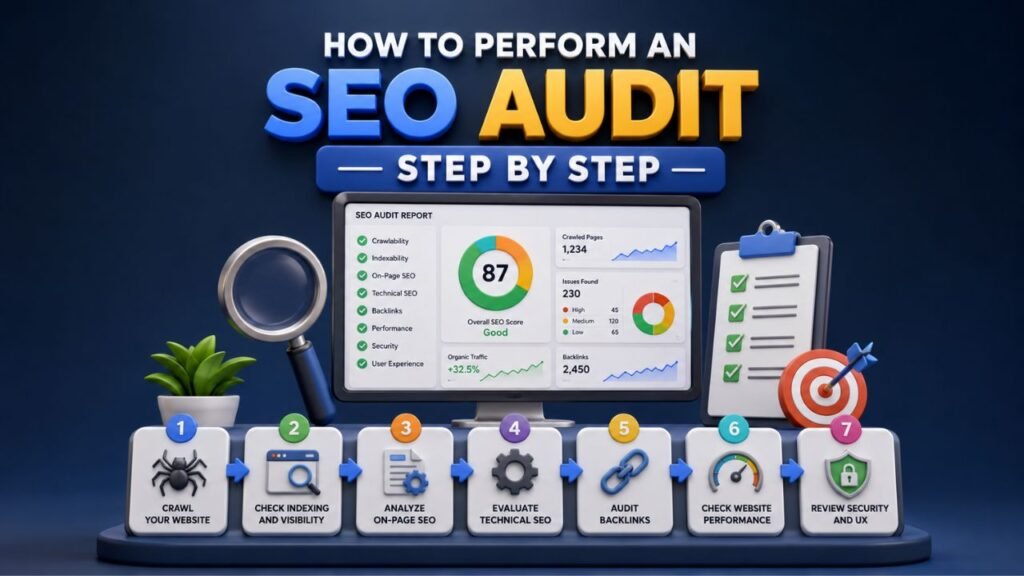
If you want a repeatable workflow, use this sequence.
Step 1: Define the Audit Goal
Determine what you are trying to investigate.
Examples include:
- General SEO health
- Traffic decline
- Website migration
- New client onboarding
- Content performance
- Technical problems
- Ranking improvement
Step 2: Crawl the Website
Use a crawler to collect information about URLs, status codes, titles, headings, canonicals, directives, links, and other technical elements.
Step 3: Check Indexation
Compare crawl data with indexation data from available search engine tools.
Look for important pages that are:
- Not indexed
- Incorrectly indexed
- Canonicalized elsewhere
- Blocked
- Redirected
Step 4: Review Technical SEO
Investigate:
- HTTPS
- Redirects
- Canonicals
- XML sitemap
- Robots.txt
- Status codes
- Duplicate URLs
- Site architecture
Step 5: Audit On Page SEO
Review:
- Titles
- Meta descriptions
- Headings
- URLs
- Images
- Keyword targeting
- Internal links
Step 6: Analyze Content
Evaluate:
- Search intent
- Content quality
- Topic coverage
- Content overlap
- Thin content
- Outdated content
Step 7: Review Internal Links
- Identify important pages that lack contextual internal links.
- Build connections between related pages where those links genuinely help users.
Step 8: Analyze Backlinks
Review the quality, relevance, diversity, and history of the backlink profile.
Step 9: Analyze Competitors
Identify what competing pages are doing better and where legitimate opportunities exist.
Step 10: Prioritize Issues
- Don’t give every issue the same priority.
- Separate critical problems from improvements that can wait.
Step 11: Implement Fixes
- Work through the prioritized list.
- Document major changes so you can understand their effects later.
Step 12: Monitor Results
After implementation, monitor:
- Rankings
- Impressions
- Clicks
- Organic traffic
- Conversions
- Indexation
- Crawl behavior
- Performance
SEO is an iterative process. One audit should lead into the next improvement cycle.
Best Tools for an SEO Audit
Different tools answer different questions.
| Tool | Primary Use |
|---|---|
| Google Search Console | Search visibility and indexing |
| Google Analytics | Organic traffic and conversions |
| PageSpeed Insights | Performance analysis |
| Lighthouse | Technical and performance testing |
| Screaming Frog | Website crawling |
| Semrush | SEO and competitor research |
| Ahrefs | Backlink and keyword analysis |
| Rich Results Test | Structured data testing |
Avoid relying on a single tool.
A crawler can identify a missing canonical, but it cannot tell you whether the page actually satisfies search intent. Search Console can show impressions, but it cannot explain every reason a competitor outranks you.
The best audits combine technical data with qualitative analysis.
How to Prioritize SEO Audit Issues?
One of the biggest mistakes SEO professionals make is treating every finding as equally important.
Instead, prioritize issues according to:
Impact × Effort × Urgency
High Priority
Fix these first when they affect important pages:
- Indexing problems
- Major crawl restrictions
- Incorrect canonicalization
- Security issues
- Broken high value pages
- Migration errors
- Significant technical barriers
Medium Priority
Examples include:
- Internal linking opportunities
- Content improvements
- Metadata optimization
- Image optimization
- Structured data improvements
Lower Priority
Examples may include:
- Minor metadata refinements
- Small usability improvements
- Low impact technical cleanup
Prioritization prevents an SEO audit from becoming a spreadsheet full of problems that nobody knows how to address.
SEO Audit Checklist Template
Use this simple framework when documenting your findings:
| Audit Area | Check | Status | Priority | Recommended Action |
|---|---|---|---|---|
| Technical SEO | HTTPS | ☐ | High | Review |
| Indexing | Noindex pages | ☐ | High | Investigate |
| Technical SEO | Broken links | ☐ | Medium | Fix |
| Content | Thin content | ☐ | Medium | Improve |
| Internal Links | Orphan pages | ☐ | High | Add relevant links |
| On Page SEO | Title tags | ☐ | Medium | Optimize |
| Images | Alt text | ☐ | Low | Improve where needed |
| Performance | Core Web Vitals | ☐ | Medium | Investigate |
| Backlinks | Lost links | ☐ | Medium | Review |
| Content | Search intent | ☐ | High | Rework if necessary |
You can expand this into a larger audit spreadsheet with columns for URL, issue type, evidence, priority, recommended fix, owner, implementation date, and status.
Common SEO Audit Mistakes to Avoid
Focusing Only on Technical SEO
- Technical SEO is important, but fixing every technical issue will not automatically make weak content rank.
- Evaluate technical health alongside content and search intent.
Chasing Keyword Density
- Repeating a keyword does not make a page more relevant.
- Write naturally and cover the topic comprehensively.
Automatically Deleting Low Traffic Pages
- Low traffic does not always mean low value.
- A page may generate leads, support other pages, rank for valuable long tail queries, or attract backlinks.
- Investigate before removing it.
Building Links Without Relevance
- Don’t chase backlink volume.
- Consider relevance, quality, editorial context, and whether the link makes sense for users.
Ignoring Internal Links
- A strong backlink profile cannot compensate for a poorly connected website architecture.
- Internal links help users and search engines discover related content.
Treating Every Issue as Urgent
An audit with 500 findings does not mean you have 500 emergencies.
Prioritize.
Making Changes Without Measuring Results
- Record important changes and monitor performance afterward.
- Without measurement, you cannot reliably determine which changes helped, which had no effect, and which created unintended consequences.
What to Do After Completing an SEO Audit
Once your audit is complete, turn your findings into an implementation plan.
Start with the issues most likely to affect important pages.
Then:
- Fix critical technical problems.
- Resolve major indexing issues.
- Improve pages that target valuable queries.
- Strengthen internal linking.
- Consolidate overlapping content.
- Improve poor user experiences.
- Address important performance issues.
- Review backlink opportunities.
- Monitor search performance.
- Re audit the website periodically.
The purpose of an SEO audit is not to create a report.
The purpose is to create better search performance through informed action.
Conclusion
A professional SEO audit should give you more than a list of errors.
It should tell you what is wrong, why it matters, which pages are affected, how you can fix it, and what you should prioritize first.
Use this SEO Audit Checklist as a repeatable framework rather than a one time exercise. Start with crawlability and indexability, move into technical and on page SEO, evaluate content and search intent, strengthen internal linking, review performance and backlinks, and then connect your findings with actual search and business data.
Most importantly, don’t try to fix everything at once.
Find the problems that matter most, make informed changes, document what you changed, and monitor the results.
That approach turns an SEO audit from a routine checklist into a practical process for improving a website’s organic search performance.
FAQs
What is an SEO audit checklist?
An SEO audit checklist is a structured list of checks used to evaluate a website’s technical SEO, crawlability, indexability, content, on page optimization, internal linking, performance, backlinks, structured data, and overall search visibility.
How do I perform an SEO audit?
Start by defining the audit objective, crawl the website, review crawlability and indexability, analyze technical SEO, evaluate content and search intent, check internal links and backlinks, analyze competitors, prioritize issues, implement fixes, and monitor results.
How often should you perform an SEO audit?
The frequency depends on the website. Smaller websites may benefit from an audit every six months, while large or frequently changing websites may require monthly monitoring and regular technical reviews.
What are the most important SEO audit factors?
Important areas include crawlability, indexability, technical SEO, search intent, content quality, internal linking, mobile experience, Core Web Vitals, structured data, backlinks, and overall website architecture.
Which tools are best for an SEO audit?
Useful tools include Google Search Console, Google Analytics, PageSpeed Insights, Lighthouse, Screaming Frog, Semrush, Ahrefs, and Google’s structured data testing resources. Each tool provides different types of information, so combining several sources generally produces a stronger audit.
How long does an SEO audit take?
The time required depends on website size and complexity. A small website can be reviewed relatively quickly, while an enterprise website with thousands or millions of URLs may require a much more extensive crawl, data analysis, and prioritization process.
Can an SEO audit improve Google rankings?
An audit itself does not improve rankings. The value comes from identifying problems and opportunities, implementing appropriate fixes, and measuring the results. Resolving issues that affect crawling, indexing, content quality, relevance, or user experience can contribute to better organic performance.
What should I fix first during an SEO audit?
Start with issues that can prevent important pages from being crawled, indexed, or properly understood. Then address major content, internal linking, performance, and user experience problems based on their potential impact and implementation effort.